What Is Crawl Budget and Does It Matter for Your Site?
Crawl budget is one of those SEO terms that sounds more important than it usually is. Consultants mention it in audits, and SEO tools flag “crawl budget issues.” As a result, website owners worry they’re somehow wasting Google’s attention. However, here’s the truth: most websites don’t need to think about crawl budget at all.
In this guide, I’ll explain what crawl budget actually means. Moreover, I’ll cover when it genuinely matters and when you’re better off ignoring it entirely.
What Is Crawl Budget?
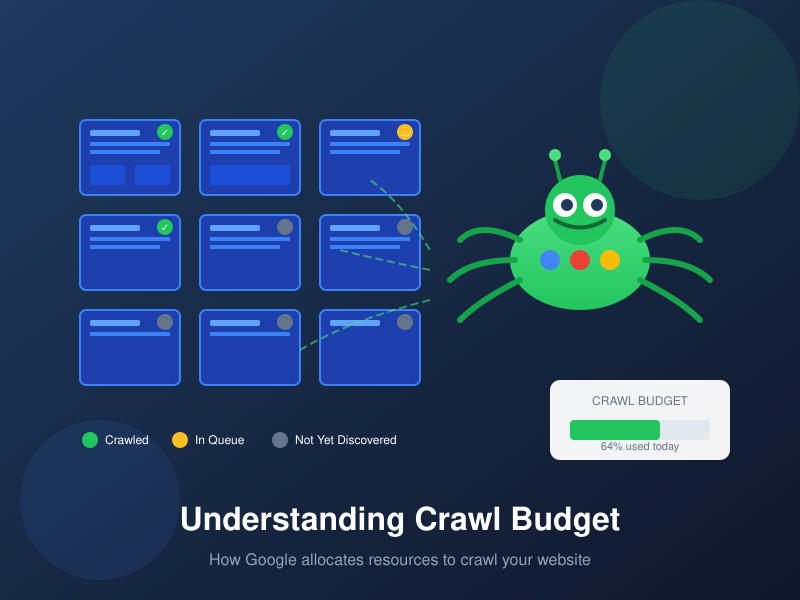
Crawl budget is the amount of time and resources Google allocates to crawling your website. Specifically, it determines how many pages Googlebot will request during each visit. It also determines how often Googlebot comes back.
Think of it this way: Google has billions of pages to crawl across the entire web. Therefore, it can’t spend unlimited time on any single site. Instead, it allocates a “budget” to each one. For most sites, this budget is more than enough. However, for very large sites, it can become a bottleneck.
According to Google’s official documentation, crawl budget is “the set of URLs that Google can and wants to crawl.”
The Two Components of Crawl Budget
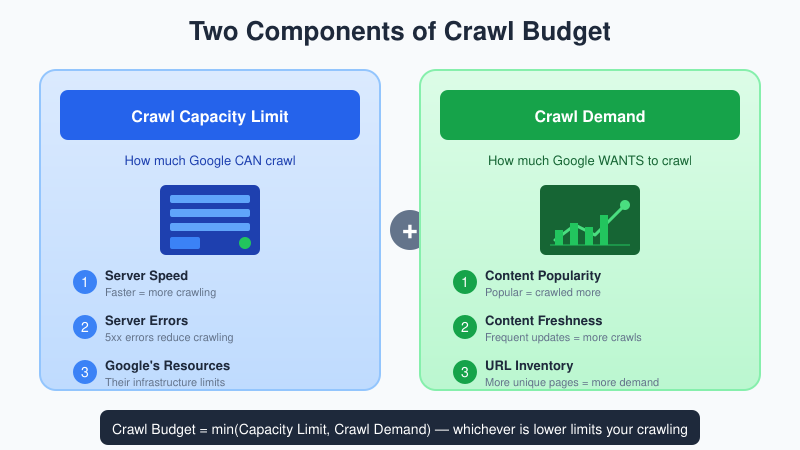
Crawl budget isn’t a single number. Instead, it’s determined by two factors working together:
1. Crawl Capacity Limit
This is the maximum crawling Google can do without overloading your server. It’s based on three main factors:
- Server speed — Faster servers get crawled more aggressively
- Server errors — Too many 5xx errors cause Google to back off
- Google’s resources — Google’s own infrastructure limits also play a role
If your server responds slowly or returns errors, Google reduces its crawl rate. This happens automatically—you don’t control it directly. As a result, improving server performance directly increases your crawl capacity.
2. Crawl Demand
This is how much Google wants to crawl your site. It depends on several factors:
- Content popularity — Popular pages get crawled more often
- Content freshness — Frequently updated content gets recrawled more
- URL inventory — More unique URLs means more crawl demand
- Content quality — Low-value pages may be deprioritized
For example, a news site that publishes 50 articles daily has much higher crawl demand. In contrast, a 20-page brochure site that rarely changes has minimal demand.
Does Crawl Budget Matter for Your Site?
Here’s the honest answer: probably not.
Google’s own documentation states this clearly:
“If your site does not have a large number of pages that change rapidly, or if your pages seem to be crawled the same day that they are published, you don’t need to read this guide.”
In other words, for the vast majority of websites, crawl budget is a non-issue. This includes most small business sites, blogs, and even mid-sized e-commerce stores. Google has more than enough capacity to crawl your entire site regularly.
The 10,000-Page Rule of Thumb
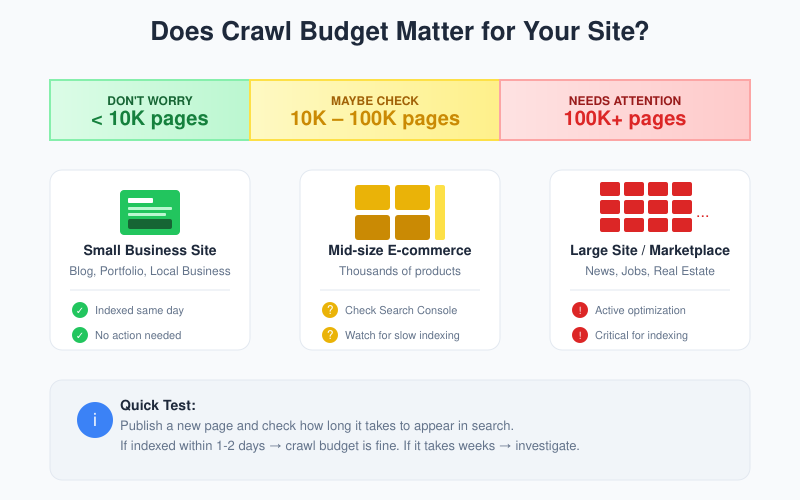
Here’s a common guideline: if your site has fewer than 10,000 pages, crawl budget probably isn’t your problem. Similarly, if you have fewer than 1,000 pages, it’s almost certainly not your problem.
| Site Size | Crawl Budget Concern? |
|---|---|
| Under 1,000 pages | Almost never an issue |
| 1,000–10,000 pages | Rarely an issue |
| 10,000–100,000 pages | May need attention |
| 100,000+ pages | Likely needs optimization |
| 1 million+ pages | Critical priority |
If your pages get indexed within a day or two of publication, your crawl budget is fine. Therefore, stop worrying about it and focus on other SEO priorities.
When Crawl Budget Actually Matters
Crawl budget becomes a real concern in specific situations. Below are the five most common scenarios:
1. Very Large Websites
Sites with hundreds of thousands or millions of pages often can’t get everything crawled regularly. This includes large e-commerce catalogs, job boards, real estate listings, and news archives. For these sites, prioritization becomes essential.
2. Sites with Rapid Content Changes
If you publish or update content faster than Google indexes it, you may have a crawl budget constraint. News sites and marketplaces often face this challenge. Consequently, they need to optimize their crawl budget carefully.
3. Sites Generating Many Duplicate URLs
Some platforms create multiple URLs for the same content. Examples include filtered product pages, session IDs in URLs, infinite calendar pages, and faceted navigation. This wastes crawl budget on duplicates instead of unique content.
4. Sites with Slow Servers
If your server is slow, Google reduces its crawl rate to avoid overloading it. As a result, fewer pages get crawled per visit. This can become a problem as your site grows.
5. Sites with Indexing Delays
If you see many URLs stuck in “Discovered – currently not indexed” status for weeks, crawl budget might be a factor. However, content quality is often the real issue. It’s important to distinguish between these two problems.
How to Check If You Have a Crawl Budget Problem
Before optimizing anything, confirm you actually have a problem. Here are three ways to check:
1. Check Google Search Console
First, go to Settings → Crawl stats. Then look at these metrics:
- Total crawl requests — Is Google crawling your site regularly?
- Average response time — Slow responses indicate server issues
- Host status — Look for “Hostload exceeded” errors
2. Check Indexing Coverage
Next, in Search Console, go to Pages (formerly Coverage). Look for these status messages:
- “Discovered – currently not indexed” — Large numbers here may indicate crawl issues
- “Crawled – currently not indexed” — This is a quality issue, not crawl budget
Important distinction: “Discovered – currently not indexed” means Google knows about the URL but hasn’t crawled it yet. On the other hand, “Crawled – currently not indexed” means Google crawled it but chose not to index it. The latter is a content quality signal, not a crawl budget problem.
3. Test New Page Indexing Speed
Finally, publish a new page and check how quickly it appears in search results. If important new content takes weeks to get indexed (and it’s linked from other pages), you might have a crawl constraint. This relates to how quickly Google discovers and indexes your content, similar to how engagement metrics like bounce rate indicate content performance after indexing.
How to Optimize Crawl Budget
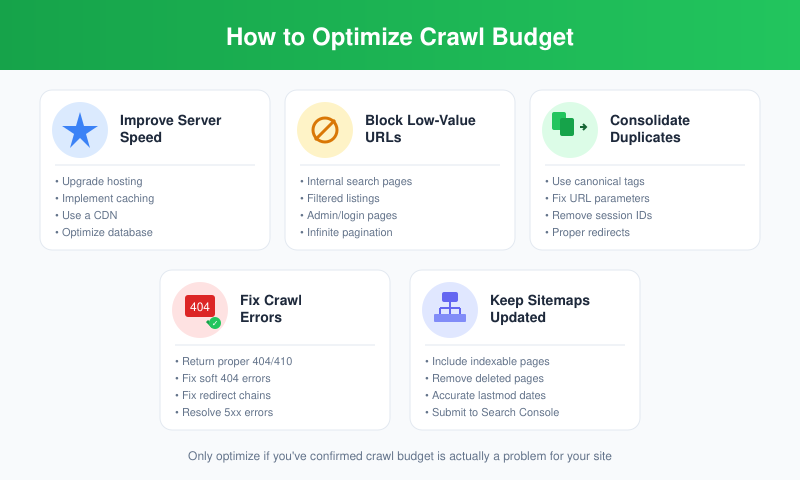
If you’ve confirmed crawl budget is actually a problem, here’s how to address it. Below are six proven strategies:
1. Improve Server Performance
Faster servers = higher crawl capacity limit. This is the most direct way to increase how much Google crawls. Consider these improvements:
- Upgrade hosting if needed
- Implement caching
- Optimize database queries
- Use a CDN
2. Block Low-Value URLs with robots.txt
Use robots.txt to prevent Google from crawling pages that don’t need to be indexed. For example:
- Internal search results pages
- Filtered/sorted product listings (use canonical tags for the main version)
- Admin areas and login pages
- Infinite pagination beyond useful depths
Note: Don’t use robots.txt to block pages you want indexed but think are wasting budget. Google won’t reallocate that budget to other pages. Instead, it simply won’t crawl the blocked URLs.
3. Consolidate Duplicate Content
Duplicate URLs waste crawl budget. Therefore, address them by:
- Using canonical tags consistently
- Implementing proper redirects for duplicate pages
- Fixing URL parameter issues
- Removing session IDs from URLs
4. Fix Crawl Errors
Broken pages waste crawl budget and signal poor site health. Here’s what to fix:
- Return proper 404 or 410 status codes for removed pages
- Fix soft 404 errors (pages that should return 404 but don’t)
- Eliminate redirect chains (A→B→C→D)
- Fix server errors (5xx responses)
5. Keep Sitemaps Updated
XML sitemaps help Google discover your important URLs. Follow these best practices:
- Include only indexable pages
- Remove deleted pages promptly
- Use accurate lastmod dates (don’t fake them)
- Submit sitemaps in Search Console
6. Consider IndexNow (Optional)
IndexNow is a protocol that lets you notify search engines immediately when content changes. Currently, it’s supported by Bing and Yandex (not Google yet). For sites with frequent updates, it can improve crawl efficiency on those platforms.
Crawl Budget Myths
Let’s clear up some common misconceptions about crawl budget:
Myth: More Crawling = Better Rankings
False. Crawl frequency affects how quickly new content appears in search results. However, it doesn’t affect rankings. Rankings depend on content quality, relevance, and authority. This is similar to how conversion rate benchmarks vary by context—crawl frequency alone doesn’t determine success.
Myth: 404 Errors Waste Crawl Budget
False. Google has confirmed that 404 errors don’t waste crawl budget. They’re a normal part of the web. Google crawls them once, sees the 404, and moves on.
Myth: Blocking Pages Shifts Budget to Other Pages
False. If you block URLs with robots.txt hoping Google will crawl other pages more, it doesn’t work that way. Google only reallocates crawl capacity if it was hitting your server limits.
Myth: Small Sites Need Crawl Budget Audits
False. Most small business websites don’t have crawl issues. If an SEO audit flags “crawl budget problems” on a 500-page site, they’re probably selling you something you don’t need.
When to Actually Worry About Crawl Budget
Focus on crawl budget optimization only if:
- You have 10,000+ unique pages
- New important content takes weeks to get indexed
- Search Console shows “Hostload exceeded” errors
- You have massive numbers of “Discovered – currently not indexed” URLs
- Your site generates many URL variations (filters, parameters, etc.)
For everyone else: focus on creating good content, building a clean site structure, and fixing obvious technical issues. Crawl budget will take care of itself.
Bottom Line
Crawl budget is the amount of resources Google allocates to crawling your site. It’s determined by your server capacity and how much Google wants to crawl your content.
For most websites—especially those under 10,000 pages—it’s not something you need to optimize. Google has plenty of capacity to crawl smaller sites completely.
However, if you do have a large site or see clear symptoms of crawl constraints, focus on three things: server speed, eliminating duplicate URLs, and blocking truly unnecessary pages. These symptoms include slow indexing and “Hostload exceeded” errors.
Most importantly, don’t let SEO tools scare you into optimizing problems you don’t have. Check the data first, then act if there’s actually an issue.