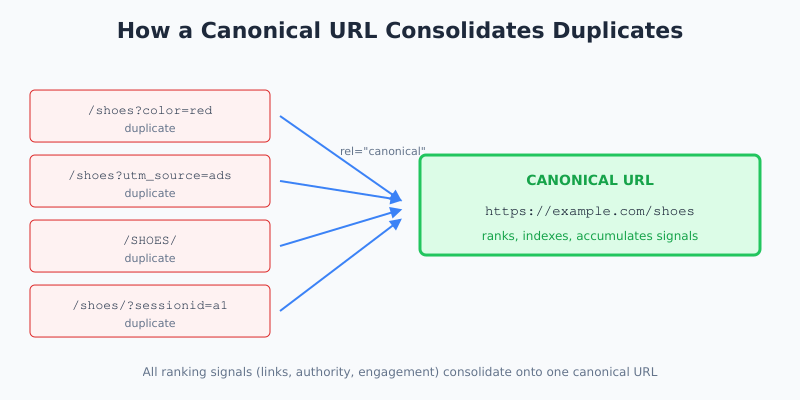
A canonical URL tells Google which version of a page you actually want ranked when multiple URLs serve the same or similar content. Get it right and you consolidate ranking signals onto one URL. Get it wrong and you either dilute your rankings across duplicates or quietly deindex pages you meant to keep visible.
I’ve audited canonical implementation on dozens of sites, and it’s the single technical SEO element most likely to be silently broken. The tag looks present, the syntax looks fine — and then you check Search Console and half the pages are reporting “Alternate page with proper canonical tag” when that’s not what you wanted at all.
What Is a Canonical URL?
A canonical URL is the URL you designate as the “master” version of a page when duplicate or near-duplicate content exists at multiple addresses. You declare it using the <link rel="canonical" href="..."> tag in the <head> of each HTML document, or via an HTTP Link response header for non-HTML resources.
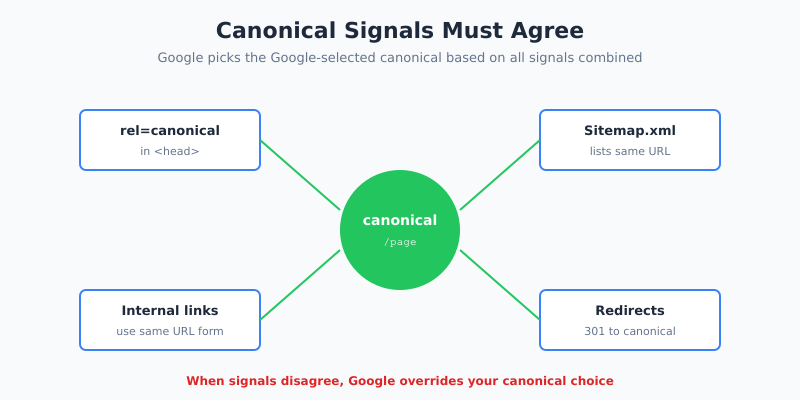
The tag is a hint, not a directive. Google takes your canonical suggestion into account along with other signals — internal links, sitemap inclusion, redirects, and content similarity — and then picks what it calls the Google-selected canonical. In most cases these match. Sometimes they don’t, and that’s usually when trouble starts.
Why Duplicate URLs Happen
Almost every non-trivial site generates duplicate URLs without meaning to. The most common sources are:
- URL parameters —
?utm_source=,?sort=,?sessionid= - HTTP vs HTTPS variants during incomplete migrations
- www vs non-www hostnames both resolving
- Trailing slash inconsistencies (
/pagevs/page/) - Uppercase vs lowercase paths in URLs
- Print-friendly or AMP versions of the same content
- E-commerce filters and faceted navigation
- Syndication — your article republished on a partner site
Without a canonical tag, Google has to guess which version to index. It usually guesses right. But “usually” is exactly the word you don’t want governing your SEO strategy.
When to Use Canonical URLs
Use a canonical tag any time the same (or substantially similar) content is reachable at more than one URL and you want Google to credit only one of them. Here are the concrete scenarios where canonicals earn their keep:
| Scenario | Canonical Strategy |
|---|---|
| URL parameters for tracking/filtering | Point to the clean parameterless URL |
| Product variants (color, size) | Point to the main product page |
| Pagination (/page/2, /page/3) | Self-canonical each page (don’t point to page 1) |
| Syndicated content on partner sites | Partner points canonical to your original |
| Mobile-specific URLs | Point to the desktop/responsive URL |
| HTTP/HTTPS after migration | HTTP redirects to HTTPS; HTTPS is self-canonical |
| Campaign landing pages with small variations | Use self-canonical if ranking matters |
However, self-canonical tags are also valuable on every indexable page — not just duplicates. They’re a defense against URL parameters you haven’t anticipated, and they cost nothing.
How to Implement a Canonical Tag
The implementation is trivial; the discipline around it is what matters. Here’s the syntax:
<head>
  <link rel="canonical" href="https://example.com/page" />
</head>
Three rules govern whether Google will respect it:
- Place it inside
<head>. If the tag ends up in<body>— which happens when a content block or embed accidentally contains the tag — Google ignores it entirely. - Use absolute URLs, including protocol and domain:
https://example.com/page, not/page. - One canonical per page. Multiple
rel=canonicaltags confuse Google, which typically picks neither.
For extra safety, ensure all your other signals agree with the canonical. If your canonical says https://example.com/page/ but your sitemap lists https://example.com/page and internal links use http://example.com/page/, Google will have to pick one. That includes structured data: when the URL inside your JSON-LD @id or mainEntityOfPage disagrees with the canonical, run a schema markup checker before pushing changes — it surfaces these mismatches in seconds. Conflicting signals are the fastest way to get Google to override your canonical choice. The official Google Search Central guide covers edge cases worth reading before any migration.
Canonical vs Redirect: Which One Should You Use?
This is the question I get asked most often. Both consolidate signals; they do it differently.
| Use a 301 redirect when | Use a canonical tag when |
|---|---|
| Users should never reach the old URL | Both URLs must stay accessible |
| URL has permanently changed | Duplicates exist for legitimate reasons (filters, tracking) |
| Site migration (domain, protocol, structure) | Syndication across sites you don’t control |
| Consolidating retired product pages | Pagination with self-canonical |
| You want strongest ranking signal transfer | You want a hint, not a hard redirect |
In other words, 301s are a directive; canonicals are a suggestion. If you have the option to redirect and don’t need the duplicate URL to remain accessible, redirect. It’s stronger and less ambiguous.
Common Canonical Mistakes
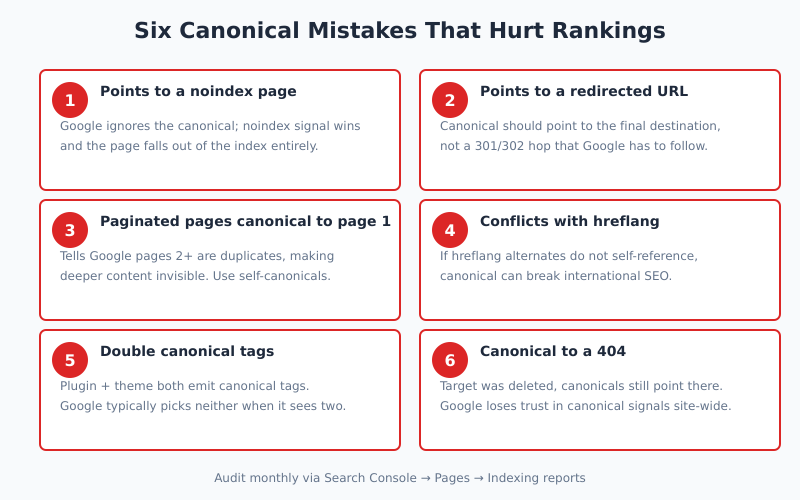
These are the six patterns I see most often in audits — each one quietly undermines rankings without throwing obvious errors.
- Canonical pointing to a noindex page. Google typically ignores such canonicals and picks its own. The “noindex” signal wins.
- Canonical pointing to a redirected URL. You want the canonical to be the final destination, not a waypoint.
- Canonical on every paginated page pointing to page 1. This tells Google pages 2+ are duplicates of page 1 — and deeper content becomes invisible. Use self-canonicals on paginated URLs.
- Mixed signals with hreflang. If the hreflang alternates don’t self-reference, the canonical can override them and break international SEO. Run a structured data validation on the affected templates before deploying canonical changes — it catches return-tag mismatches and missing x-default that are otherwise invisible.
- Canonical set by plugin, overridden by theme. WordPress sites often emit two conflicting canonical tags — one from Yoast or Rank Math, another hardcoded in the theme.
- Canonical to a 404. When the canonical target gets deleted but canonicals still point at it, Google loses trust in the signal site-wide.
For teams doing content syndication, also see how canonicals interact with crawl priorities — I cover this in crawl budget: what it is and when it matters, since duplicate URLs without canonicals can inflate crawl waste on large sites.
How to Audit Your Canonicals
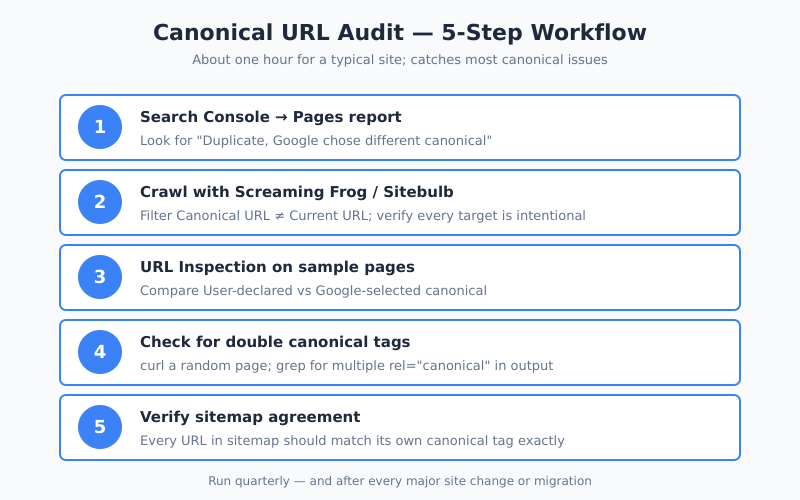
A canonical audit takes about an hour for a typical site and catches most of the issues above. Here’s the workflow I run:
- Check Google Search Console → Pages → “Alternate page with proper canonical tag” and “Duplicate, Google chose different canonical.” The second bucket is where real problems hide.
- Crawl the site with Screaming Frog or Sitebulb and filter for Canonical URL ≠ Current URL. Every row is a page whose signals Google is being asked to consolidate — verify the target is intentional.
- Inspect a sample of URLs using Search Console URL Inspection. Compare “User-declared canonical” to “Google-selected canonical.” Mismatches are your short list.
- Check for double canonicals —
curla random page and search the HTML for multiplerel="canonical"tags. Plugins + themes are the usual culprits. - Confirm sitemap agreement — every URL in your sitemap should match its own canonical tag. If they disagree, Google gets a mixed signal.
This pairs well with reviewing your Core Web Vitals performance at the same time, since duplicate URLs can split your CrUX data and make performance reports look worse than they are. For bigger sites, the Semrush canonical guide has useful audit heuristics for scale.
Canonicals and AI Search
As AI search systems — Google’s AI Overviews, ChatGPT browsing, Perplexity — become more important, canonicals do more work than ever. (For the bigger picture on how these engines are reshaping search, see how AI search changes SEO strategy.) These systems need a clear “source of truth” when multiple URLs have overlapping content, and they tend to defer to the canonical when picking which version to cite. The same principle drove the structured data history from XML schemas to JSON-LD: machine-readable identity matters when bots, not humans, decide what gets surfaced.
Specifically, sites with noisy canonical signals risk being cited inconsistently in AI responses, or not cited at all. A syndicated article without a canonical back to your origin can end up credited to the republisher. The fix is the same as for traditional SEO: make sure the canonical on every duplicate page points unambiguously to the version you want in the answer, and use a structured data planner to map which schema types should sit on the canonical version (Article, Product, FAQ) versus the duplicates (none). Once the markup is in place, it is worth validating your structured data so a malformed node does not undermine the canonical you just cleaned up.
Canonical Tags and Internal Linking
Internal links vote for which URL version you prefer. Therefore, if your canonical points to /page/ but every internal link on your site points to /page, you’re sending conflicting signals. Google will still probably pick your canonical, but consistency is cheaper insurance than trusting Google to guess right.
A quick fix: run your crawler, export all internal links to each canonicalized URL, and batch-update any that disagree with the canonical form. This is especially important on content that also runs A/B tests, since testing frameworks often create URL variants. I cover this intersection in how to run A/B tests without fooling yourself.
Bottom Line
A canonical URL is a hint to Google about which version of a page deserves the ranking credit. It’s cheap to set, easy to break, and quietly critical on any site with parameters, pagination, syndication, or more than one way to reach the same content. Every indexable page should have a canonical tag — either pointing to itself or to another URL you’ve deliberately chosen as the master.
Ultimately, the goal is signal consistency: canonical, sitemap, internal links, and redirects all agreeing on one URL per piece of content. When they do, Google indexes what you want, AI search cites what you want, and your rankings consolidate where you want them. When they don’t, you spend months wondering why traffic isn’t growing.