Article schema tells Google what a page is about before it reads a single word of your copy. It labels the page as an article, names the author, stamps the publish date, and points to the image and publisher behind it. Add it correctly and you become eligible for article rich results and Top Stories carousels. Get it wrong, and Search Console quietly flags missing required fields while your competitors keep the enhanced listing.
I’ve validated structured data on dozens of editorial sites, and Article schema is where I see the same four mistakes over and over: a headline that’s too long, a publisher with no logo, an image at the wrong aspect ratio, and an author written as plain text instead of a proper entity. This guide gives you a complete, copy-paste-ready Article JSON-LD block with every property explained, a decision table for picking the right type, and the exact errors to check for before you ship.

What Article Schema Is (and Which Pages Need It)
Article schema is a piece of structured data that describes a page as a news story, blog post, or editorial article using the vocabulary from schema.org. You add it as a block of JSON-LD in the page’s <head> or <body>, and search engines parse it to understand the page’s purpose, authorship, and freshness.
The format matters. Of the three structured data formats schema.org supports, Google explicitly recommends JSON-LD over the older Microdata and RDFa because it sits in one self-contained block instead of being tangled through your HTML. As a result, it’s far easier to generate, audit, and keep in sync with the visible page.
Not every page deserves Article schema. Use it on content that reads like an article and nothing else:
- Blog posts and editorial guides — the most common use, marked up as
BlogPosting - News stories and press releases — time-sensitive reporting, marked up as
NewsArticle - How-to and tutorial pages that are genuinely article-shaped
Conversely, do not put Article schema on product pages, category archives, your homepage, contact forms, or tool landing pages. Those have their own schema types (Product, CollectionPage, WebSite, SoftwareApplication). If you’re unsure what each page on your site actually needs, see which schema types your page needs first, then come back here for the article-specific markup.
Article vs NewsArticle vs BlogPosting
This is the choice that trips people up, and the peer guides almost never explain it. All three are valid types, and all three nest under the same parent. Article is the broad base type. NewsArticle and BlogPosting are both subtypes of Article, so anything you can say about an Article is also valid on the more specific ones.
The practical rule: be as specific as the content honestly allows. A more specific type gives search engines a clearer signal, but only if it’s accurate. Misusing NewsArticle on an evergreen tutorial is worse than using a plain Article.
| Type | Use it when… | Don’t use it when… |
|---|---|---|
NewsArticle |
The page is time-sensitive reporting — breaking news, announcements, press releases. Required for Top Stories and the news carousel. | The content is evergreen and won’t go stale in a week. |
BlogPosting |
The page is a blog post or editorial guide written by an identifiable author with a personal or brand voice. | The page is a formal news report or a non-article page. |
Article (base) |
The page is article-shaped but fits neither subtype cleanly — a long-form resource, a documentation essay. | You can honestly use a more specific subtype instead. |
For most editorial blogs, BlogPosting is the honest choice. Use NewsArticle only if you genuinely publish dated, time-sensitive reporting and want news-surface eligibility. When in doubt, the base Article type never hurts your eligibility — the required and recommended properties are identical across all three.
Required and Recommended Properties
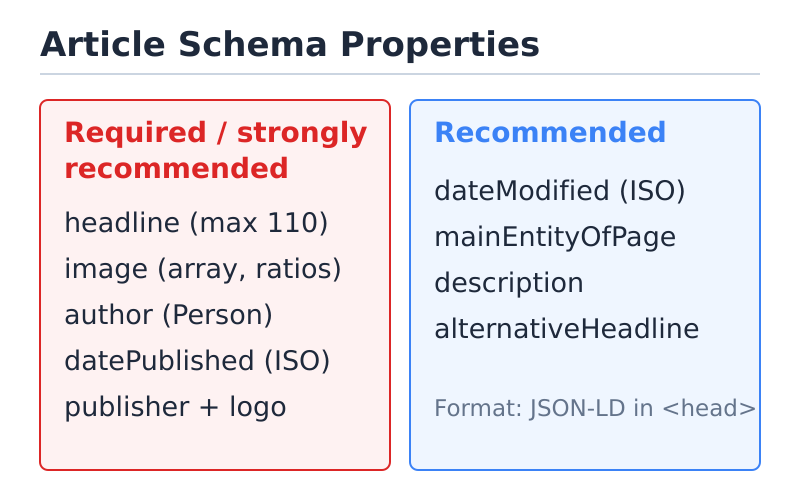
Google splits Article properties into two groups. Required properties must be present and valid, or the markup fails enrichment and you lose rich-result eligibility. Recommended properties are optional, but they sharpen the signal and unlock more presentation features. According to Google’s article structured-data documentation, the genuinely required field for an article is the headline — but in practice you want the full recommended set, because missing fields like author, datePublished, image, and publisher routinely show up as warnings and weaken eligibility.
| Property | Status | What it holds |
|---|---|---|
headline |
Required | The article title. Maximum 110 characters — longer and Google ignores it. |
image |
Recommended (strongly) | One or more URLs to a high-resolution image. Multiple aspect ratios preferred. |
author |
Recommended (strongly) | A Person or Organization entity — not a plain string. |
datePublished |
Recommended (strongly) | First publish date in ISO 8601 format, e.g. 2024-03-12T08:00:00+00:00. |
dateModified |
Recommended | Last meaningful edit, ISO 8601. Strong freshness signal. |
publisher |
Recommended | An Organization with a nested logo ImageObject. |
mainEntityOfPage |
Recommended | The canonical URL of the page the markup describes. |
One detail worth internalizing: Google’s “required” list is shorter than most checklists imply, but its rich-result eligibility quietly depends on the recommended fields too. Therefore, treat the strongly-recommended properties above as effectively mandatory. A page with only a headline technically validates, yet it rarely earns the enhanced listing.
Copy-Paste Article JSON-LD Example
Here is a complete JSON-LD block with every property annotated. Drop it into the <head> of your page, swap the placeholder values for your real data, and you have a valid Article markup. I’ve used BlogPosting because it’s the right choice for most editorial sites — change "@type" to "NewsArticle" or "Article" if your content calls for it.
<script type="application/ld+json">
{
  "@context": "https://schema.org",
  "@type": "BlogPosting",
  "mainEntityOfPage": {
    "@type": "WebPage",
    "@id": "https://example.com/blog/article-schema-guide/"
  },
  "headline": "Article Schema: A Practical JSON-LD Guide",
  "description": "How to add Article schema in JSON-LD with required properties and examples.",
  "image": [
    "https://example.com/images/article-1x1.jpg",
    "https://example.com/images/article-4x3.jpg",
    "https://example.com/images/article-16x9.jpg"
  ],
  "author": {
    "@type": "Person",
    "name": "Jonathan Henderson",
    "url": "https://example.com/about/"
  },
  "publisher": {
    "@type": "Organization",
    "name": "Example Media",
    "logo": {
      "@type": "ImageObject",
      "url": "https://example.com/logo.png",
      "width": 600,
      "height": 60
    }
  },
  "datePublished": "2024-03-12T08:00:00+00:00",
  "dateModified": "2024-05-02T10:30:00+00:00"
}
</script>
A few things to notice in that block:
- The headline is short and well under 110 characters.
- image is an array of three URLs at different aspect ratios (1:1, 4:3, 16:9) — Google prefers having ratio options to choose from.
- author is a nested
Personwith anameand aurlpointing to an author or About page, which strengthens E-E-A-T. - publisher includes a nested
logoImageObject— the single most-skipped required piece. - Both dates use full ISO 8601 timestamps with a timezone offset, not loose date strings.
Keep the values in this JSON-LD identical to what’s visible on the page. The headline should match your on-page H1, the dates should match what readers see, and the author should be the byline. Mismatches between markup and visible content are a structured-data policy violation and can get your enhancements dropped.
Common Article Schema Errors (and Fixes)
These are the failures I hit most often when auditing live pages. Each one either throws a hard error or a warning in Google’s Rich Results Test, and each one has a one-line fix.
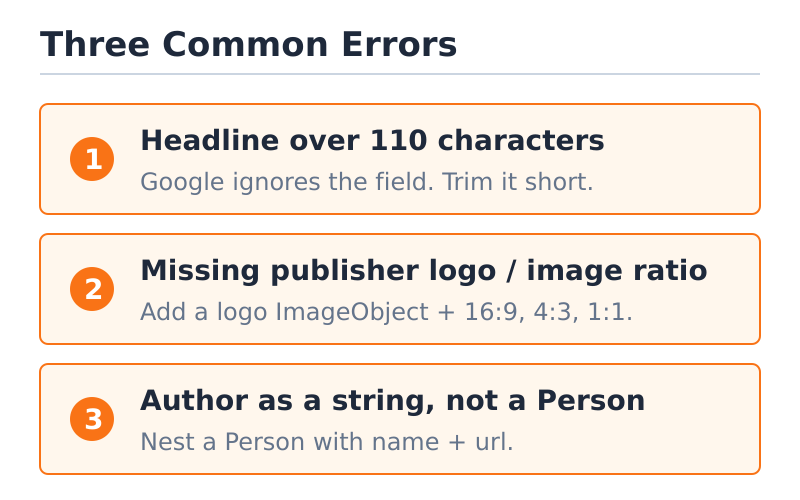
Headline over 110 characters
The headline property has a hard limit: 110 characters. If yours runs longer, Google ignores the field entirely, which can drop your article from rich-result eligibility. This catches people because their visible title is fine — it’s the markup’s headline value, often auto-generated from a long SEO title or a title-plus-subtitle string, that blows past the limit.
Fix: trim the headline to a concise version of the title, under 110 characters, and never stuff your full meta title or a title-and-tagline into it. If you need the longer phrasing, that’s what the name or alternativeHeadline properties are for.
Missing publisher logo or wrong image ratio
Two image problems account for most of the warnings I see. First, the publisher Organization is present but has no nested logo ImageObject — or the logo URL 404s. Second, the article image is a single tiny thumbnail or an odd aspect ratio. Google wants images that are at least 1200 pixels wide and prefers the 16:9, 4:3, and 1:1 ratios.
Fix: add a real logo ImageObject under publisher with a working URL, and supply your hero image as an array covering the three common ratios. A reachable logo and a high-resolution image at the right ratio clear both warnings at once.
Author as a string instead of a Person
The most common modeling mistake is writing "author": "Jane Doe" as a plain string. It technically parses, but it tells search engines nothing about who Jane is. A bare string can’t carry a url, a sameAs link, or a job title — all signals that feed author authority and E-E-A-T.
Fix: always model the author as a nested entity — a Person for an individual byline or an Organization for staff content — with at least a name and a url. This is a small change with an outsized effect on how clearly your authorship is understood.
Generate, Then Validate Your Markup
Writing JSON-LD by hand is fine once you understand the structure, but the reliable workflow is generate, then validate. Build the block from your real page data, then check it against the spec before it ships — that’s what catches the headline-length and missing-logo problems above while they’re still cheap to fix.
Once your block is assembled, validate your Article JSON-LD to confirm every required property is present and well-formed. The validator parses your markup the way a search engine does and flags exactly which fields are missing, malformed, or over the character limit, so you’re not guessing. If you want to understand what the checker is actually doing under the hood, our walkthrough of how schema validation works covers the mechanics.
To validate on WordPress specifically, here’s the practical loop:
- Add the JSON-LD via your SEO plugin (Yoast and most plugins emit Article schema automatically) or a custom
<script>in the head. - Run the live URL through the validator and Google’s Rich Results Test.
- Fix any required-property errors, re-test, and only then request indexing.
One honest caveat: valid Article schema makes you eligible for a rich result, but it does not guarantee one. Google decides whether to show enhanced listings based on quality, relevance, and surface availability. Clean markup is the price of admission, not a promise of the prize. Treat it as removing the obstacles — the content still has to earn the placement.
Frequently Asked Questions
What is Article schema and which pages need it?
Article schema is structured data that labels a page as an article — a blog post, news story, or editorial guide — using the schema.org Article vocabulary expressed as JSON-LD. Because it is structured data rather than visible copy, it gives search engines an explicit, machine-readable summary of the page. Use it on genuinely article-shaped content like blog posts, news, and tutorials. Skip it on product pages, homepages, category archives, and tool pages, which have their own schema types.
Article vs NewsArticle vs BlogPosting — which type should I use?
Use NewsArticle for time-sensitive reporting that needs Top Stories eligibility, BlogPosting for editorial blog posts with a named author, and the base Article type when neither subtype fits cleanly. Be as specific as the content honestly allows; all three share the same required and recommended properties.
What are the required properties for Article schema?
Google formally requires only the headline, but rich-result eligibility effectively depends on the strongly-recommended set: image, author (as a Person or Organization), datePublished, and publisher with a nested logo ImageObject. Treat that full set as mandatory for any page that wants the enhanced listing.
Why is the headline limited to 110 characters?
Google caps the headline property at 110 characters and ignores the field entirely if it runs longer, which can drop your rich-result eligibility. Keep the markup’s headline a concise version of your title; use name or alternativeHeadline for any longer phrasing.
Does Article schema guarantee a rich result?
No. Valid Article schema makes you eligible for article rich results and Top Stories, but Google decides whether to actually show them based on quality, relevance, and surface availability. Clean markup removes the obstacles; it doesn’t promise the placement.
How do I add and validate Article JSON-LD on WordPress?
Most SEO plugins, including Yoast, emit Article schema automatically; you can also add a custom JSON-LD script in the head. Then run the live URL through a schema validator and Google’s Rich Results Test, fix any missing required properties, re-test, and request indexing only after it passes.