Valid JSON-LD and a working rich result are not the same thing. I have shipped markup that passed every validator I threw at it, yet Google still showed a plain blue link. That gap trips up almost everyone who works with structured data, and it starts with one misunderstanding: a JSON-LD validator confirms that your code is well-formed, not that Google will reward it.
This guide explains what a JSON-LD validator actually checks, the errors it catches most often, and how to draw a clear line between valid syntax and rich-result eligibility. By the end, you will know exactly how to validate your markup before it goes live and how to confirm the payoff inside Google Search Console.
This site grew out of XML schema validation — DTD, XSD, RelaxNG — so I will frame JSON-LD the same way: as a producer/consumer contract. You produce the markup; a search engine consumes it. Validation is simply the step where you confirm both sides agree on the contract before anyone relies on it.
What a JSON-LD Validator Actually Checks
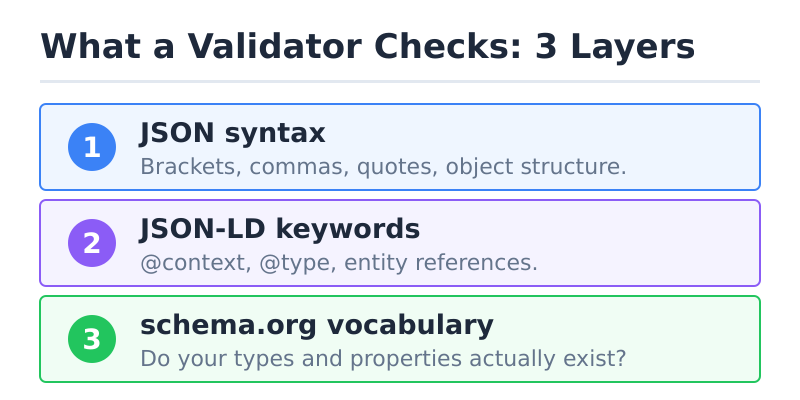
A JSON-LD validator checks three layers, and it is worth keeping them separate in your head. First, it parses the JSON itself: brackets, commas, quotes, and the overall object structure. Second, it inspects the JSON-LD keywords that give the data meaning — @context, @type, and the way entities reference each other. Third, the better validators compare your properties against the schema.org vocabulary to see whether the types and fields you used actually exist.
That layered structure matters because a failure at one layer hides the next. A missing comma is a syntax error, so the parser stops before it ever reaches the schema check. Fix the comma, and suddenly the validator reports a wrong @type it could not see before. As a result, validation is iterative — you fix, re-run, and fix again until the report is clean.
Here is the key boundary, though. A validator confirms your markup is well-formed and vocabulary-correct. It does not promise a rich result, and it cannot judge whether your content deserves to rank. Those are separate decisions Google makes later. Treat the validator as a spell-checker for structured data: necessary, but never sufficient.
When you are ready to test your own markup, you can validate your JSON-LD with our schema markup checker and read each finding line by line.
JSON-LD Validator vs Google’s Rich Results Test
People use “JSON-LD validator” to mean two different tools, and conflating them causes most of the confusion. The two that matter are schema.org’s Schema Markup Validator and Google’s Rich Results Test. They answer different questions, so you usually want both.
The Schema Markup Validator checks your markup against the full schema.org vocabulary. It tells you whether your types and properties are real and whether your JSON-LD is structurally sound. It is vocabulary-strict but search-neutral — it does not know or care what Google does with the data.
Google’s Rich Results Test is narrower and more opinionated. It only evaluates the schema types Google supports for rich results — Product, Recipe, Article, Event, and a few dozen others. That list shrinks whenever Google retires a feature: FAQPage left it after the FAQ rich result was switched off on 7 May 2026. Crucially, it applies Google’s required property rules, which are often stricter than schema.org’s. A field schema.org treats as optional can be mandatory for a Google rich result.
So the practical rule is simple. Use the Schema Markup Validator to confirm your markup is correct in general. Then run the Rich Results Test to confirm Google will accept it for a specific feature. If you only had to pick one for a page that targets a rich result, pick Google’s tool — but do not assume passing it means your underlying schema is otherwise flawless.
| Question | Schema Markup Validator | Rich Results Test |
|---|---|---|
| Is the JSON-LD syntax valid? | Yes | Yes |
| Are my types/properties real schema.org terms? | Yes | Partially (only supported types) |
| Will this produce a Google rich result? | No | Yes (eligibility only) |
| Applies Google’s required-property rules? | No | Yes |
| Covers non-Google schema types? | Yes | No |
The Most Common JSON-LD Validation Errors (and Fixes)
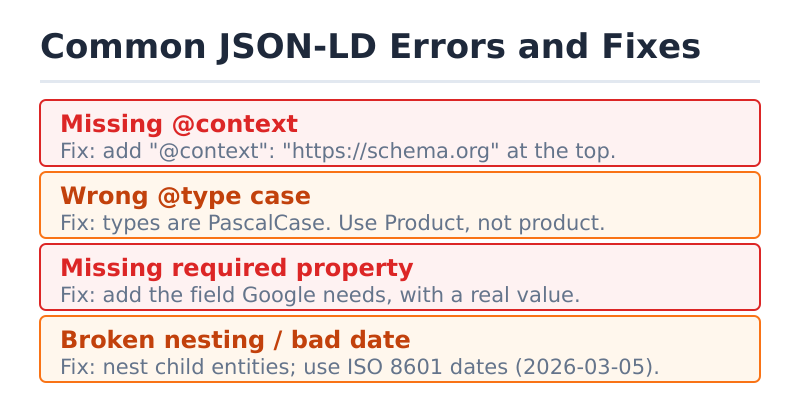
After enough audits, the same handful of mistakes show up again and again. Below is a hand-built reference of the JSON-LD errors I see most, what causes each one, and the exact fix. Skim the table, then read the sections underneath for the ones that bite hardest.
| Error | Cause | Fix |
|---|---|---|
Missing @context | No vocabulary declared, so terms are undefined | Add "@context": "https://schema.org" at the top of the object |
Wrong @type case | Used product instead of Product | Match schema.org casing exactly — types are PascalCase |
| Missing required property | Left out a field Google needs (e.g. name, image) | Add the required property with a real value, not a placeholder |
| Currency on Offer | Price given without priceCurrency | Add "priceCurrency": "USD" to every Offer |
| Bad date format | Used 03/05/2026 instead of ISO 8601 | Use 2026-03-05 (or full ISO datetime) for date fields |
| Broken nesting | Flattened a child entity that should be nested | Nest the entity (e.g. Offer inside Product) as an object |
| Invalid JSON | Trailing comma or unquoted key | Remove trailing commas; quote every key and string value |
Missing or wrong @context / @type
Every JSON-LD block needs two anchor keys. The @context key tells the parser which vocabulary you are using — almost always https://schema.org. The @type key tells it which entity you are describing, such as Article or Product. Omit either one and the validator cannot map your fields to anything meaningful.
Case sensitivity is the sneaky part. Schema.org types are PascalCase, so Product validates while product does not. Properties, on the other hand, are camelCase — datePublished, not DatePublished. Validators flag these as unrecognized terms rather than syntax errors, which is why a structurally perfect file can still fail. When in doubt, copy the exact spelling straight from the schema.org type page.
Missing required properties
The single most common reason markup fails the Rich Results Test is a missing required property. Google publishes a required and recommended field list for each supported type, and the required ones are non-negotiable. A Product without a name, or a recipe without recipeIngredient, simply will not qualify.
One trap deserves a warning. Filling required fields with placeholder text — "name": "Product Name" — passes the validator but violates Google’s content guidelines, because the markup must describe what is actually visible on the page. So treat “required” as “required and truthful.” Validation cannot catch a dishonest value, but a manual review can.
Nested-entity and data-type mistakes
Real-world entities contain other entities, and nesting them correctly is where many people slip. An Offer belongs inside a Product as a nested object, not as a sibling at the top level. Flatten it, and the validator reports the price as floating data with no owner. The same applies to author (a Person or Organization) inside an Article.
Data types cause the rest of the noise. A price should be a string or number, not a currency-formatted blob like "$19.99". A date must follow ISO 8601 (2026-03-05) rather than a regional format. These produce warnings or errors depending on the tool, but either way they are easy to fix once you know the expected shape.
Errors vs Warnings: Which Ones Block Rich Results
Validators sort findings into two buckets, and the difference decides what you fix first. An error means the markup is broken for the feature you are targeting — Google will not generate the rich result until you resolve it. A warning means the markup works, but a recommended field is missing, so you may get a less complete result.
In practice, errors are blocking and warnings are optional. If a Product is missing priceCurrency, that is an error and the price snippet will not show. If it is missing aggregateRating, that is a warning — the result still appears, just without stars. So fix every error, then clear warnings in priority order by how much each enhancement is worth to you.
One nuance about SEO impact. A warning does not hurt your rankings, and neither does an error in any direct sense — structured data is not a ranking factor on its own. What an error costs you is eligibility: no rich result means a less prominent listing, which can lower click-through. So the damage is indirect but real, and it is the reason to clear errors before you ever publish.
How to Validate JSON-LD Before It Goes Live
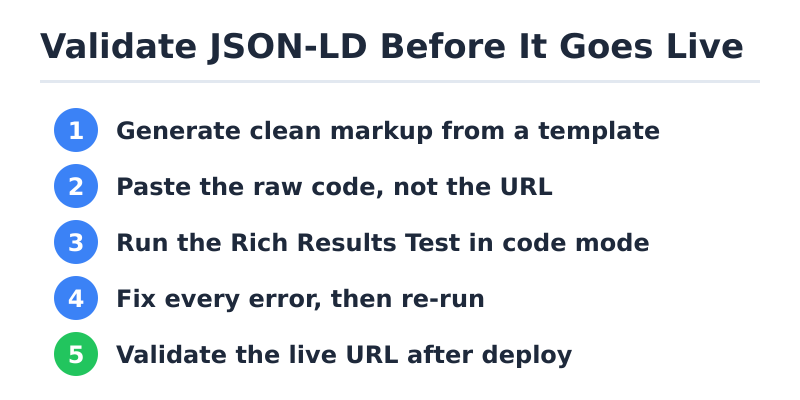
Most tutorials assume your page is already public, but the smart time to validate is before it ships — on staging, or even straight from your editor. Catching a syntax error at that point costs minutes; catching it after Google has crawled a broken page costs a re-crawl and lost time. Here is the workflow I use, in order.
- Generate clean markup first. Start from a correct template so you are debugging values, not structure — it pays to generate clean JSON-LD first rather than hand-coding from a blank file. If you do build the schema by hand, it helps to decide which schema types your page needs before you write a single line.
- Paste the raw code, not the URL. For not-yet-indexed or staging pages, paste the JSON-LD directly into the tool. You can paste it into the JSON-LD validator and check the syntax and vocabulary without exposing the page publicly.
- Run the Rich Results Test in code mode. Google’s tool accepts a code snippet too, so you can confirm feature eligibility before the URL is live.
- Fix every error, then re-run. Validation is iterative — clear errors first, warnings second, and re-test after each change.
- Validate the live URL after deploy. Once published, run the URL itself so the tool sees the rendered output, including any markup injected by your CMS or a plugin.
That last step matters more than people expect. A plugin can rewrite or duplicate your JSON-LD at render time, so the markup you wrote and the markup Google sees are not always identical. Validating the live URL is the only way to confirm the contract still holds after every layer of your stack has had its turn.
If you find the whole topic of schema discipline interesting, it is worth reading how XML schema validation evolved into structured data — the same validate-the-contract mindset, applied to a new consumer.
From Validation to Rich Results in Search Console
Passing a validator is the start, not the finish. The place where you confirm Google actually accepted your markup is Google Search Console, under the Enhancements reports. Each supported type — Products, FAQs, Breadcrumbs — gets its own report showing valid items, items with warnings, and items with errors, pulled from Google’s real index rather than a one-off test.
This is also why your JSON-LD can pass validation yet still show no rich result. The validator only saw a snapshot; Google Search Console reflects what was crawled, deduplicated, and judged eligible. Common reasons for the gap include the page not being indexed yet, Google deciding the content does not warrant the feature, or a quality issue the validator cannot detect. Therefore, after you fix errors, use the URL Inspection tool and the relevant Enhancement report to watch the status change over days, not seconds.
The closing mental model is the contract again. You validate to prove your side of the agreement is well-formed. Google’s structured data documentation defines its side — what each feature requires. And Search Console is the audit log that tells you whether both sides finally agreed. Get all three aligned, and the rich result follows.
Frequently Asked Questions
What is a JSON-LD validator and what does it actually check?
A JSON-LD validator checks whether your structured data is well-formed and uses real schema.org terms. Specifically, it parses the JSON syntax, confirms the required keys like @context and @type are present and correctly cased, and compares your properties against the schema.org vocabulary. What it does not do is guarantee a rich result or judge ranking — it verifies the markup is technically correct, which is the necessary first step but not the whole job.
Is a JSON-LD validator the same as Google’s Rich Results Test?
No, and the difference matters. A general validator such as schema.org’s Schema Markup Validator checks your markup against the full vocabulary and stays neutral about search engines. Google’s Rich Results Test only evaluates the schema types Google supports and applies Google’s stricter required-property rules. As a result, markup can pass one and fail the other. For a page that targets a specific rich result, run both: the Schema Markup Validator for correctness, the Rich Results Test for eligibility.
Why does my JSON-LD pass validation but still not show a rich result?
Because valid syntax and rich-result eligibility are separate things. A validator confirms your code is correct in isolation, but Google decides whether to show the feature based on crawling, indexing, and quality signals it judges at index time. The page may not be indexed yet, Google may consider the content unworthy of the enhancement, or a guideline issue may apply. Check the relevant Enhancement report in Google Search Console to see Google’s actual verdict rather than the validator’s snapshot.
What are the most common JSON-LD validation errors?
The frequent offenders are a missing @context, a wrongly cased @type (product instead of Product), a missing required property, a price without priceCurrency, a date in a non-ISO format, and broken nesting where a child entity like Offer sits at the top level instead of inside its parent. Trailing commas and unquoted keys round out the list as pure JSON syntax errors. Each has a clean, mechanical fix once you know the expected shape.
Do warnings hurt my SEO, or only errors?
Neither directly hurts rankings, because structured data is not a standalone ranking factor. The real difference is eligibility. An error blocks the rich result entirely, so you lose the more prominent listing and the click-through that comes with it. A warning means the feature still appears but in a less complete form — for example, a product result without star ratings. So fix every error first, then clear warnings in order of how much each enhancement is worth.
How do I validate JSON-LD before it goes live?
Paste the raw markup, not the URL. Both the Schema Markup Validator and Google’s Rich Results Test accept a code snippet, so you can validate JSON-LD for a staging or not-yet-indexed page without making it public. Start from a clean template, paste the code, fix every error, then re-run until the report is clean. After you deploy, validate the live URL too — a CMS or plugin can alter the markup at render time, so the published output is the only version that ultimately counts.