Seventy percent of people who add something to an online cart never finish the purchase. That number has held steady for over a decade, across economies, industries, and platform generations. Which tells you something important: checkout abandonment isn’t a failure of individual stores — it’s a structural reality of e-commerce. The job isn’t to eliminate it (you can’t) but to systematically reduce it and recover a meaningful share of the users who leave.
In this guide, I’ll walk through what actually causes abandonment, which interventions move the rate, and how to set up a recovery flow that’s worth the engineering effort. I’ve audited checkouts for e-commerce, SaaS, and subscription products — the patterns are remarkably consistent across them.
What Is Checkout Abandonment?
Checkout abandonment is the percentage of users who begin the checkout process but don’t complete a purchase. The wider “cart abandonment” metric includes everyone who added to cart and never started checkout — a less useful number because cart adds happen for many reasons (price checking, wishlisting, comparing). Checkout-specific abandonment measures actual purchase intent that fell through.
The industry-average cart abandonment rate sits at 70.22%, based on Baymard Institute’s aggregate analysis of 50+ studies. Checkout-specific rates (users who reached the payment page) typically run 25-40%. The gap between those numbers tells you where the leak actually is — and it’s usually not where teams think.
Why People Abandon Checkout
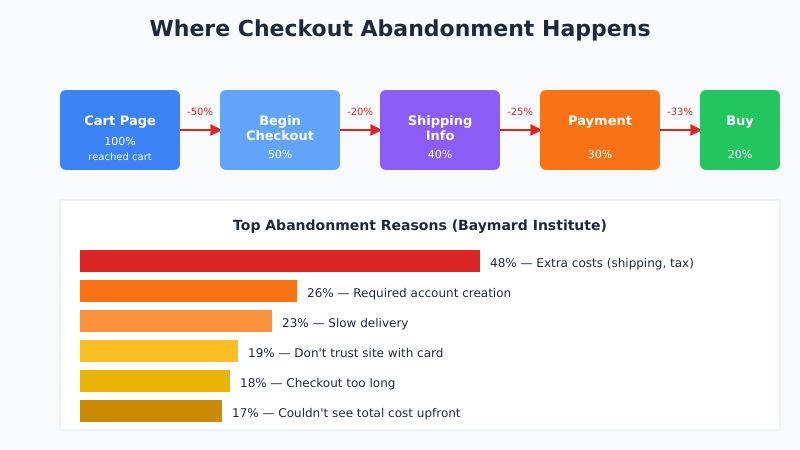
Baymard’s ongoing research has the clearest data. Ranked by how often each reason appears in user surveys:
| Reason | % of Abandonments |
|---|---|
| Extra costs (shipping, tax, fees) too high | 48% |
| Site required account creation | 26% |
| Slow delivery / shipping timing | 23% |
| Don’t trust site with credit card info | 19% |
| Checkout too long or complicated | 18% |
| Couldn’t see or calculate total cost upfront | 17% |
| Return policy unsatisfactory | 16% |
| Payment declined or errored | 11% |
| Not enough payment methods | 9% |
Notice the pattern. The top four reasons are all about surprise — costs, account requirements, delivery dates, and trust signals showing up too late in the flow. Specifically, if the user discovers any of those things at checkout instead of earlier, you’ve already lost the sale. The fix isn’t in the checkout — it’s in making sure those facts are visible before checkout starts. For context on funnel-wide leak detection, see sales funnel analysis.
The Nine Fixes That Actually Move the Rate
Ranked roughly by impact per hour of work to implement:
1. Show Total Cost Before Checkout Starts
Display shipping and taxes on the cart page, not as a surprise on the checkout summary. Offer a free shipping threshold if you can. Being honest about final cost upfront beats hiding it — even when the final number is the same.
In practice, stores that show all-in pricing on the cart page consistently reduce abandonment 15-25%. The visitors who leave after seeing it would have left at checkout anyway; the ones who stay are pre-qualified.
2. Enable Guest Checkout
Requiring account creation before purchase kills 20-30% of conversions. Offer guest checkout as the default path and account creation as an optional add-on after purchase (“Create an account with one click to save your details”). The account-conversion rate after purchase is usually higher than pre-purchase anyway.
3. Reduce Form Fields to the Essential Minimum
Most checkout forms collect 5-10 fields that the business wants but doesn’t need. First name, last name, email, address, city, state, zip, phone, company, account type — each one is friction. Standard practice should be 4-5 essential fields with everything else optional or deferred.
Address autocomplete services (Google Places, Loqate) can collapse 4 address fields into one typed line. It’s a 2-hour integration with 5-10% conversion lift. This connects directly to broader form optimization principles.
4. Offer the Payment Methods Users Expect
Card-only checkout is outdated. In 2026, mobile wallets (Apple Pay, Google Pay), PayPal, and BNPL (Klarna, Afterpay) are table stakes for consumer e-commerce. Each added payment method typically lifts conversion 2-5%; combined, they can compound to 10-15%.
5. Show Trust Signals at Payment
Security badges, SSL indicators, recognizable payment logos, and a clear return policy all reduce abandonment at the credit card step. 19% of users cite lack of trust as their abandonment reason — a big number, and almost all of it is addressable with better placement of existing trust signals. Trust also starts before the click: Product, Offer, and AggregateRating schema on the listing page surface price and review stars directly in search, and a quick pass through a structured data tester catches the malformed priceCurrency or missing availability fields that suppress those rich results.
6. Optimize for Mobile Specifically
Mobile abandonment runs 12-15 percentage points higher than desktop, and most of that gap is form input friction. Use the right input types (type="email", type="tel", inputmode="numeric") so mobile keyboards are appropriate. Test on real devices, not just responsive mode in a browser.
7. Add Progress Indicators
Multi-step checkouts convert better when users can see how many steps remain. A simple “Step 2 of 4” reduces abandonment at the tedious middle steps. Single-page checkouts don’t need this — but if you’re running a multi-step flow, make the progress visible.
8. Exit-Intent Capture (Use Carefully)
Exit-intent popups offering discounts or saving the cart can recover 5-10% of abandoning users, but they’re annoying and can depress overall conversion if poorly tuned. Test carefully. If you use them, save the cart rather than offering a discount — discount-dependent users tend to wait for popups on every purchase thereafter.
9. Implement Abandoned Cart Recovery Emails
The single highest-ROI intervention in the entire list. Email-based recovery consistently produces 10-20% of total e-commerce revenue for stores that implement it correctly. More on this in the next section.
Cart Recovery Email Strategy
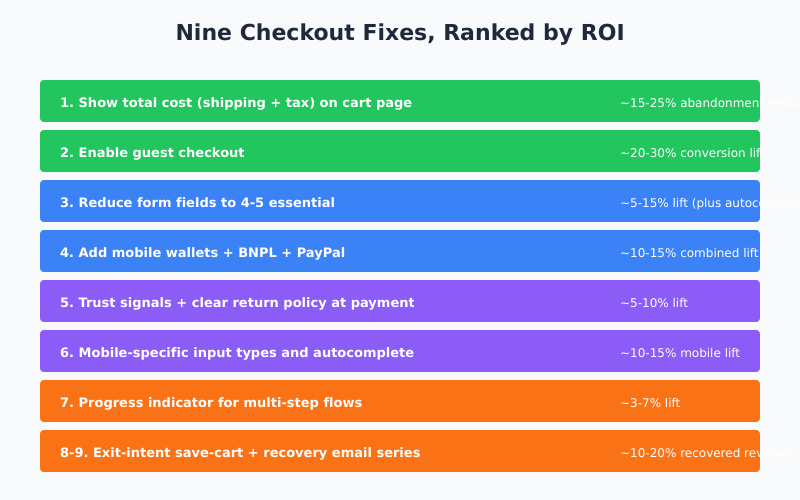
Cart recovery emails are the highest-performing recovery channel by revenue per message. A well-tuned series recovers 10-20% of abandoned carts — essentially adding that percentage to top-line conversion without acquiring any new traffic. The specifics that matter:
Timing
- First email: 60 minutes after abandonment. This single timing choice is the biggest driver of recovery rate. Waiting 24 hours reduces recovery by 40%+.
- Second email: 24 hours later. Reminds without spamming. Different angle from first email.
- Third email: 72 hours later. Last chance; include a small incentive if margin allows.
Content
Each email has a different job:
- Email 1 (60 min): Reminder + recovery link + low friction. No discount — they probably just got distracted.
- Email 2 (24h): Address common objections. Social proof, return policy, customer service reachability.
- Email 3 (72h): Urgency + optional small discount. “Items selling fast” if genuinely true.
However, avoid discounting in the first email. Users who would have purchased at full price now wait for the discount email, training them to abandon deliberately.
Personalization
Include product images, names, and the saved cart total. Generic “You left items in your cart” emails convert at roughly half the rate of personalized ones. Most email platforms (Klaviyo, Mailchimp, Omnisend, HubSpot) have built-in abandoned cart templates that handle this correctly.
Abandonment by Industry
Not all industries abandon at the same rate. Baymard and others track these benchmarks:
| Industry | Typical Cart Abandonment Rate |
|---|---|
| Fashion / Apparel | 68-74% |
| Travel / Hospitality | 83-87% |
| Finance / Insurance | 80-84% |
| Electronics | 70-75% |
| Grocery | 50-60% |
| Beauty / Cosmetics | 65-70% |
| B2B / Wholesale | 72-80% |
Therefore, benchmark against your industry before setting targets. A 65% abandonment rate is phenomenal for travel booking and mediocre for grocery. For related benchmarking methodology, see conversion rate benchmarks by industry.
Measurement Setup
You can’t fix what you don’t measure. Minimum tracking for checkout abandonment analysis:
- Track each checkout step as a separate GA4 event:
begin_checkout,add_shipping_info,add_payment_info,purchase. This lets you see which specific step loses the most users. - Capture drop-off reasons via an optional micro-survey at the cart page or exit intent (“What stopped you from ordering?”).
- Monitor by device and traffic source. Mobile and paid traffic usually show higher abandonment — aggregated numbers hide the real problem.
- Compare cart recovery performance against a control group that receives no recovery emails, at least initially. Otherwise, you can’t tell if recovery is adding revenue or just shifting when users purchase.
For details on event setup specifically, see events vs conversions in GA4.
What Doesn’t Actually Help
Four interventions that get talked about but rarely move the metric meaningfully:
- Bold CTA button colors. Contrast matters; specific hue doesn’t.
- Countdown timers on non-urgent offers. They erode trust when users realize the countdown resets.
- Chat widgets on the payment step. More often distracts than helps.
- Redesigning the checkout page. Big redesigns rarely hit their projected lift; targeted fixes to specific steps usually do.
Specifically, don’t spend weeks A/B testing button copy while the form still has 12 fields and no guest checkout option. The fundamentals pay before the polish does.
Bottom Line
Checkout abandonment at 70% is structural, not a failure. The question isn’t whether you can eliminate it — you can’t — but whether you’ve addressed the specific frictions that drive it: surprise costs, forced account creation, form friction, mobile UX gaps, and missing payment methods. Fixing those typically reduces abandonment 20-35% and adds recovered revenue through post-abandonment emails. Because a recovered shopper often returns to buy again, that revenue compounds over time — which is why it pays to think in terms of customer lifetime value rather than the single saved order.
Therefore, the playbook is clear: show total cost early, enable guest checkout, cut form fields, add mobile wallets, put trust signals at payment, optimize for mobile specifically, and implement three-email recovery with the first email at 60 minutes. None of these are new tactics — they’re just the ones that still work when all the shiny CRO advice gets stripped out.