UTM parameters are the single most useful piece of marketing attribution you can deploy in ten minutes — and the single most common source of junk data I see in analytics audits. The mechanics are trivial: append five query-string tags to a link, and Google Analytics groups the resulting traffic for you. The hard part is doing it consistently across every campaign, every channel, and every teammate who creates links.
In this guide, I’ll explain what each UTM parameter does, when to use which value, and the naming conventions that keep your reports clean rather than fragmented across “facebook,” “Facebook,” and “FB.” I’ve seen six-figure ad budgets attributed to “(not set)” because one person forgot to standardize capitalization.
What Are UTM Parameters?
UTM parameters (Urchin Tracking Module parameters) are tags you append to a URL’s query string so analytics tools can identify where the traffic came from. Google bought Urchin in 2005 and baked its tracking convention into what became Google Analytics. Every major analytics platform — GA4, Adobe Analytics, Matomo, Plausible — recognizes them. Like most web metadata standards, UTMs were a pragmatic compromise between human-readable and machine-parseable; the broader structured data history follows the same arc from rigid XML grammars toward flat key-value formats that bots can extract reliably.
A UTM-tagged URL looks like this:
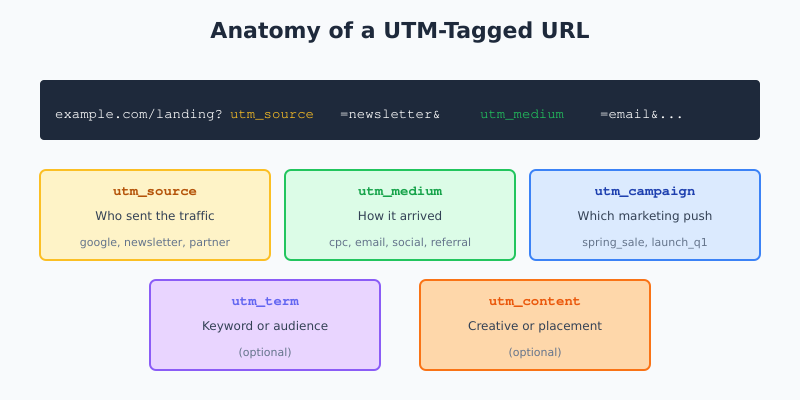
https://example.com/landing?utm_source=newsletter&utm_medium=email&utm_campaign=spring_saleWhen a user clicks that link and lands on your site, the analytics tag reads those parameters and stores them as the session’s source, medium, and campaign dimensions. Without UTMs, Google has to guess — and its referrer-based guessing is often wrong or simply labeled as “direct.”
The Five UTM Parameters
There are exactly five UTM parameters. Three are required for clean attribution; two are optional but useful for granular analysis.
| Parameter | What It Identifies | Required? | Example Values |
|---|---|---|---|
utm_source |
Who sent the traffic | Yes | google, linkedin, newsletter, partner_name |
utm_medium |
How it arrived | Yes | cpc, email, social, referral, affiliate |
utm_campaign |
Which marketing push | Yes | spring_sale, launch_q1, webinar_2026_04 |
utm_term |
Keyword or audience targeting | Optional | running_shoes, ab_testers, cfo_audience |
utm_content |
Creative or placement variant | Optional | banner_top, hero_green, subject_a |
If you tag every external link with at least source, medium, and campaign, 95% of your attribution problems disappear. The remaining 5% usually come from either missing tags on a forgotten channel or inconsistent naming — which I’ll cover next.
Source vs Medium: The Distinction That Trips People Up
The most common UTM mistake I see is confusing source and medium. They are not interchangeable, and mixing them breaks GA4’s default channel grouping.
- Source answers “what property sent them?” — the platform, newsletter, or partner by name.
- Medium answers “what kind of channel?” — the broad category like email, cpc, social, referral.
For example, a LinkedIn Ads click is source=linkedin, medium=cpc (not medium=linkedin). A newsletter link is source=newsletter, medium=email (not source=email). Swap these and your GA4 reports will show your paid social campaigns as “Unassigned” traffic because the medium value doesn’t match any known channel grouping rule.
Naming Conventions That Actually Work
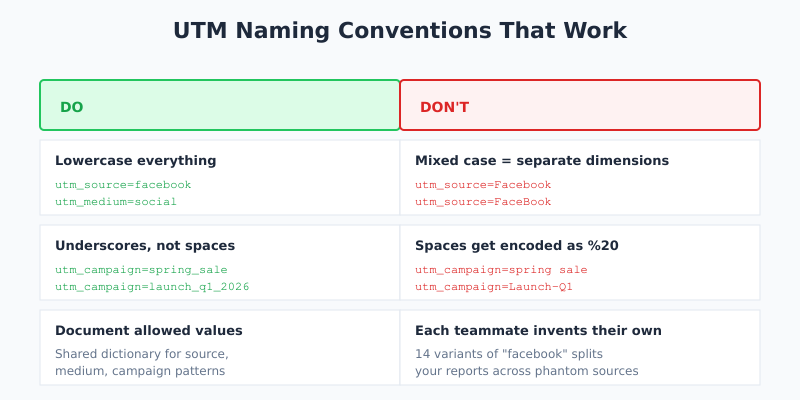
Google Analytics treats UTM values as case-sensitive strings. “Facebook,” “facebook,” and “FaceBook” are three separate dimensions. Over a quarter of running campaigns, that fragmentation can split your reported traffic across 5-10 phantom sources — each one too small to notice, but collectively distorting your channel performance.
Three rules that solve almost all of this:
- Lowercase everything. Always. No exceptions. “facebook,” “linkedin,” “email” — never capitalized.
- Use underscores, not spaces or hyphens.
spring_sale, notspring saleorspring-sale. Browsers encode spaces as%20, which looks ugly in reports and creates subtle data-matching bugs. - Document allowed values. Maintain a spreadsheet listing every valid
source,medium, and campaign-naming pattern. Share it with anyone who creates marketing links.
However, consistency only works if enforced. For teams of more than two or three marketers, use a UTM builder tool that pulls values from a dropdown rather than typing them in. Google’s Campaign URL Builder is the free baseline; paid tools like UTM.io add validation and collision detection. For context on how these parameters feed attribution calculations, see marketing attribution and why it’s getting harder.
What NOT to Do With UTMs
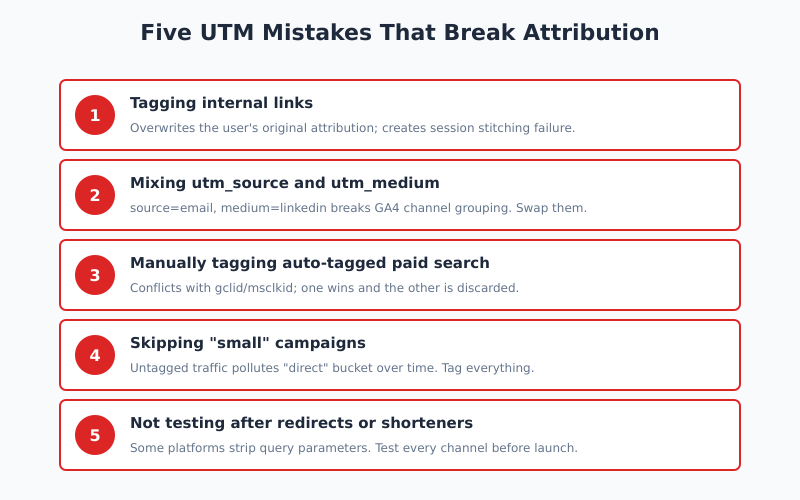
Five mistakes that kill attribution quality. In my experience, teams make at least three of these on first attempt:
1. Don’t Tag Internal Links
UTMs are for external traffic only. If you tag internal links — say, a CTA in your email that goes to one page, which then links to another page with different UTMs — the second click overwrites the original attribution. The user’s session now looks like it came from the internal navigation, not the email.
Specifically, GA4 interprets any link with UTM parameters as a new session, even within the same visit. This is called “session stitching failure” and it’s the single biggest source of inflated session counts in dashboards.
2. Don’t UTM-Tag Paid Search Automatically Tagged by the Ad Platform
Google Ads and Microsoft Ads use auto-tagging (the gclid and msclkid parameters). If you add UTMs on top of auto-tagging, one of them wins and the other is discarded — usually the UTM. Unless you specifically need custom campaign naming, let auto-tagging handle paid search.
3. Don’t Use UTMs in Emails That Link Back to Your Own Marketing Site
If a returning customer clicks your newsletter, hits a page with UTMs, then browses to another page — GA4 credits the second pageview to the newsletter session. That’s fine. But if they leave, come back three hours later, and finally purchase, GA4’s default 6-month window still credits the newsletter. That’s usually what you want for attribution, but it distorts immediate-behavior reports unless you know to filter for it.
4. Don’t Skip UTMs on “Small” Campaigns
Untagged traffic shows up as “direct” or “(not set)” and gets aggregated with all unknown sources. Over time, your most accurate attribution gets drowned in ambiguous direct traffic from small untagged campaigns. Tag everything, even one-off links you’ll use once.
5. Don’t Put UTMs on Links You Share on Platforms That Strip Them
Some link previews and shortener services strip query parameters. WhatsApp, Telegram, and several enterprise chat platforms do this inconsistently. Test every channel before trusting its UTM data — especially if a channel shows unusually low volume.
Building a UTM Strategy That Scales
For a single marketer, UTMs are a tactical tool. For a team, they become a data governance problem. Here’s the minimum scaffolding I recommend for any team past five people:
- Create a UTM dictionary. A shared spreadsheet or wiki page listing every approved
source,medium, and campaign naming rule. Lock it; require review before new values are added. - Use a link builder tool. Don’t let people type UTMs by hand. Dropdowns enforce the dictionary.
- Align mediums with GA4 channel grouping. Use
cpc,email,social,referral,organic,display,affiliate. These map to GA4’s default channel groups; anything else becomes “Unassigned.” - Audit quarterly. Pull a list of all
sourceandmediumvalues seen in the last 90 days; flag anything that doesn’t match the dictionary. - Document the why. Keep a changelog of campaign-naming changes so historical reports stay interpretable.
This pairs well with monitoring your channel-grouping quality alongside bounce rate and engagement metrics — because a channel showing unusually bad engagement is often just mistagged traffic from another source.
Reading UTM Data in GA4
In GA4, UTM parameters populate several dimensions, some session-scoped and some event-scoped. The most useful ones:
| GA4 Dimension | Populated From | Scope |
|---|---|---|
| Session source | utm_source at session start |
Session |
| Session medium | utm_medium at session start |
Session |
| Session campaign | utm_campaign at session start |
Session |
| First user source | utm_source on first-ever session |
User |
| Session manual term | utm_term |
Session |
| Session manual ad content | utm_content |
Session |
Mix session-scoped and user-scoped dimensions carefully. If you want to know “which source brought me new customers,” use First user source. If you want “which source is driving this quarter’s traffic,” use Session source. The difference matters for attribution modeling. The Google official UTM reference documents all available dimensions.
Bottom Line
UTM parameters are a ten-minute setup that earns you months of clean attribution data — or a ten-minute setup that quietly corrupts your reports for a year, depending on how disciplined your naming is. The mechanics are simple: tag every external link with source, medium, and campaign, use lowercase and underscores, never tag internal links, and let ad platforms auto-tag their own traffic.
Ultimately, UTMs are a governance problem more than a technical one. The teams with clean attribution have a UTM dictionary, a link builder tool, and a quarterly audit. The teams with messy attribution have 14 variants of “facebook” and wonder why their paid social numbers never match the ad platform.